Loading...
Quick Start Guide
Run a challenge in minutes
This guide explains how to set up a community sports challenge, share your event page, and keep stage or segment results clear without organizer chaos.
Step-by-step Party setup
1Create a Party from a GPS file or in near feature from favorite Strava segment.
2You can even build a multi-stage event.
3Share the public link or QR with participants.
4Watch your challenge and moderate results when needed.
Example Party use-case
A local cycling club runs a Saturday segment challenge. The organizer publishes one public event page, riders sync their own attempts during the available submission window, and everyone who raced and submitted can review their results, provided the creator has not deleted the Party.
The same flow works for running clubs and mixed multisport communities that want one simple event result page.
Open example PartyStep-by-step Cycle setup
1Create several Parties for your planned events.
2Combine the Parties into one Cycle.
3Choose the scoring rules and event order.
4Share the Cycle standings with participants.
Example Cycle use-case
A club runs a four-week series: a hill climb, a time trial, a trail run, and a gravel ride. Each event is its own Party, while the Cycle combines their results into shared standings.
Participants can join the individual events and follow their points across the whole series, so every finish contributes to the final ranking.
Open example CycleFAQ
01
Do participants need to upload files manually?
01
Do participants need to upload files manually?
In a file-based Party, a participant uploads a recorded GPX, TCX, or FIT route to submit a result. The same file can also be used to create your own Party, but you do not need to create anything to join an existing event. Strava is demo-only for now and generates synthetic data.
02
Why do I need to use an actual recorded track to create a Party?
02
Why do I need to use an actual recorded track to create a Party?
We believe this is the best way to ensure challenges are authentic and routes are verified and ridable, not just virtual. This guarantees higher challenge quality, where the creator takes responsibility for their events!
03
Which files can I use to create a Party or submit a result?
03
Which files can I use to create a Party or submit a result?
You can use recorded GPX, TCX, and FIT route files both to create your own Party and its stages, or to submit a result to an existing Party without creating an event of your own.
04
Can I reuse saved stages when creating a Party?
04
Can I reuse saved stages when creating a Party?
Yes. Load saved stages from the Stages workspace and use them in a new Party without recreating the course.
05
Can I include more than one stage when creating a Party?
05
Can I include more than one stage when creating a Party?
Yes, use multi-stage mode and get stage + overall rankings.
06
What do participants need?
06
What do participants need?
A regular account and one sync action to submit their effort.
07
Are rewards available in every Party?
07
Are rewards available in every Party?
No. Rewards are an optional feature that the Party creator can enable for their event. If rewards are enabled, you will see corresponding information on the event page.
08
How can I win a reward in a Party?
08
How can I win a reward in a Party?
If the creator has enabled rewards, they will be unlocked after the submission window closes and the challenge criteria are met (e.g., reaching the required number of participants). Once the Party ends, qualifying winners will receive instructions on how to claim their reward.
10
How long can a challenge last?
10
How long can a challenge last?
As long as the creator sets it for the Party.
11
How long can users submit results?
11
How long can users submit results?
As long as the creator sets the submission window in the Party.
12
Why is Strava currently in BETA?
12
Why is Strava currently in BETA?
The Strava integration is currently in BETA. You can connect your account and sync results, but the feature set, limits, and sync flow may still change as the integration evolves.
13
Can I share this with non-technical users?
13
Can I share this with non-technical users?
Yes, the public page and QR flow are intentionally simple.
14
What is the difference between a Cycle and a Party?
14
What is the difference between a Cycle and a Party?
A Cycle combines several public Parties into one shared points standings. Each Party keeps its own results, while the Cycle aggregates places and converts them into points.
15
Can I add my own and other organizers' Parties to a Cycle?
15
Can I add my own and other organizers' Parties to a Cycle?
Yes. You can add your own public Parties immediately, and you can invite other organizers' public Parties. A Party appears in the Cycle after the owner accepts the invitation.
16
How are points calculated in a Cycle?
16
How are points calculated in a Cycle?
Points are awarded for place in each Party according to the selected preset or a custom points table. The Cycle standings sum those points across all accepted Parties.
17
Can I change scoring after a Cycle starts?
17
Can I change scoring after a Cycle starts?
Only until the first accepted Party in the Cycle has not started yet. Once the Cycle effectively begins, scoring is locked so the rules cannot change during competition.
18
Can I sync data from cloud services?
18
Can I sync data from cloud services?
Yes. You can sync route files from Dropbox, Google Drive, and OneDrive. We request full access, but we only look for GPS files! As a best practice, keep your GPS files in your chosen cloud service and avoid storing other sensitive data there for security.
19
How accurate is your GPS track time?
19
How accurate is your GPS track time?
It is good enough for fun route challenges, but not chip-timing accurate. Results depend on the device and track quality. A clean track is usually close, while signal loss, pauses, and low sampling can add a few seconds or more.
What organizers and participants see
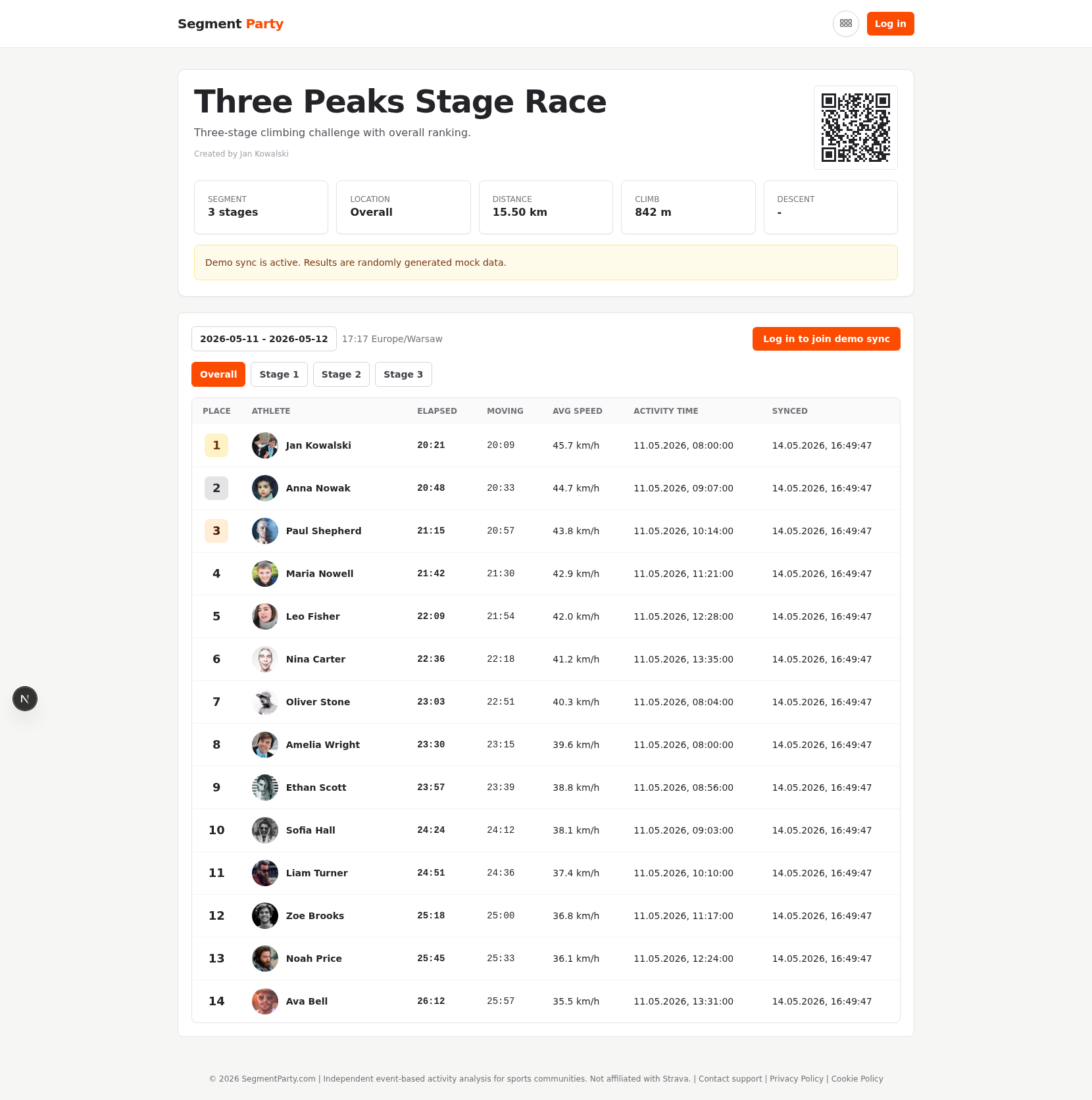
This event page is your live hub: people can check results, and organizers can generate print-friendly outputs from the same workflow.
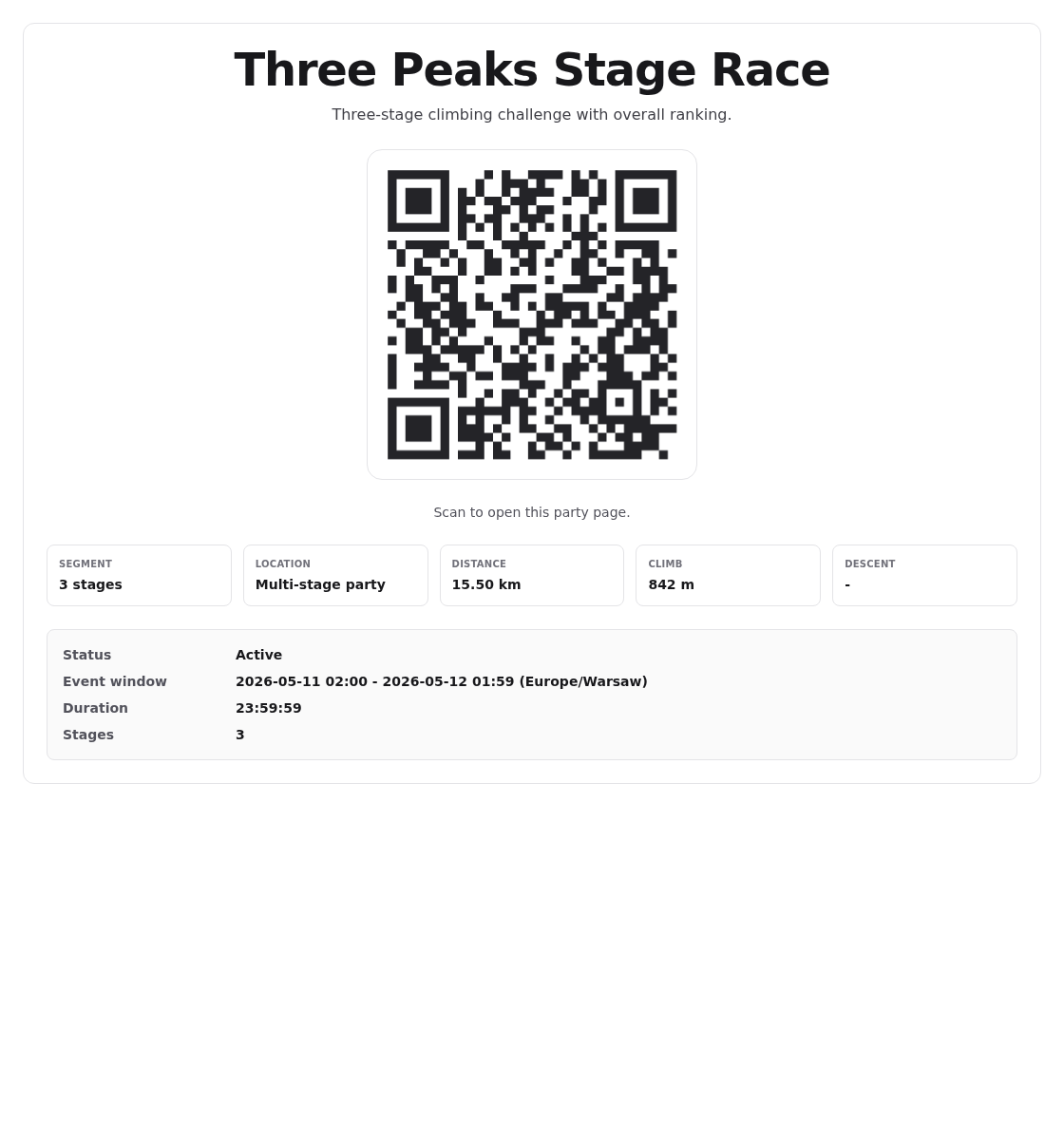
Print an A4 poster with QR for start areas, club walls, and race offices so anyone can open the event page instantly.